Now on Google Play

Your car has a story to tell.

Carspel is the only app that turns fuel fills, charging sessions, service records, trip memories and safety alerts into your car's complete life story — for petrol, diesel, LPG, plug-in hybrid, and electric vehicles — ready to hand to the next owner.

30-day free trial No credit card needed
27 languages App available in 67 — see all →
Why Carspel exists

Most people remember a fill-up or charge receipt and little else.

"Years of driving turn into guesswork. Carspel turns them into a story."

Over the life of a car, every fill-up, charging session, service visit, recalled part, and memorable road trip adds up to something valuable — a documented history that protects your family, helps at tax time, and can add real money to your resale price.

Carspel was built for those who believe their car's story is worth keeping.

Carspel was designed by Mike Levey and developed by the team at FundaMedia, a company founded in 1994 to help clients all over the world solve content management challenges.

Mike Levey: Carspel envisioner Calgary, Canada · Built for the journey, not just the odometer
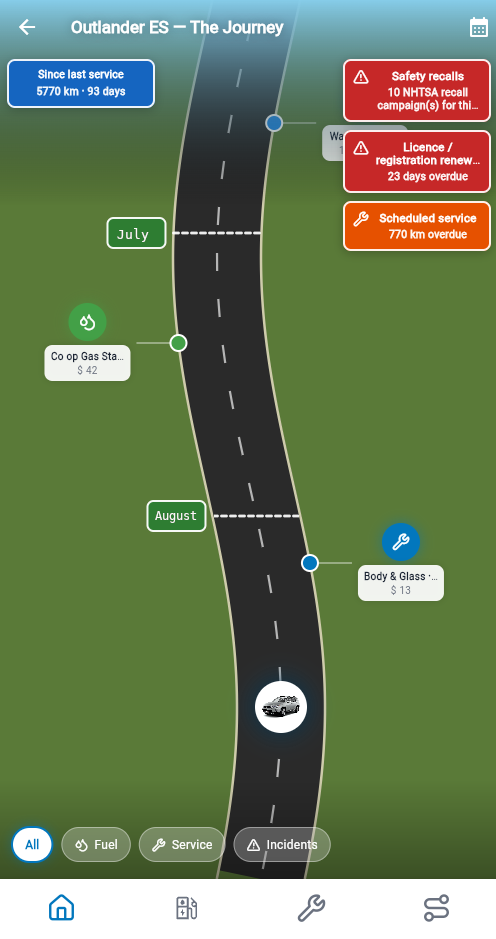
Carspel Journey screen: a winding road timeline with fuel stops, service reminders, and recall alerts marked along the route, with the app's current icon-only bottom navigation visible below.
Everything in one place

One app for the whole garage

No other app brings together fuel and energy logging, service history, trip logging, trip memories, safety recalls, and household sharing in one place — whether you drive petrol, diesel, LPG, a plug-in hybrid, or pure electric — let alone hands it all to the next owner.

Read the User Guide for fuel, EV, and plug-in hybrid logging →

Switching from Fuelio, MileIQ, or Drivvo? See how import works →

Fuel & energy log

Track every fill-up and every charge — petrol, diesel, or LPG, plus electric charging sessions — with location, volume or kWh, cost, and efficiency on one timeline. Plug-in hybrids and bi-fuel LPG cars get their fuels tracked separately, so you see true petrol, LPG, or electric efficiency, never one blended number. Built for every powertrain in the same household garage.

L/100 km · kWh/100 km · MPG

Example charge session

Service log

Log oil changes and brake work on petrol cars, and tyre rotations, inspections, cabin filters, and dealer visits for every powertrain — with odometer, shop name, and photo attachments. Build the maintenance record that protects warranty claims and resale value.

Receipts · Reminders

Example service entry

Trip log

Type a trip, follow it with Live trip while Add trip stays open, or let Auto Trip catch the drive after you leave the app. On the phone the route is drawn on a Google Map — tap to pan and zoom. Add a note, mark who drove, and combine several trips on the same car into one. Home and Work fill a start or end on every plan; a trial, Family, or Ultimate plan can keep up to six saved places, and can attach photos, short video, and a voice clip to the trip. Auto Trip is on those same plans: it drafts drives for you to Confirm, Discard, or mark Passenger. A toll, parking fee, or tax paid in another country is typed as on the receipt and stored in your home currency.

Typed · Live · Auto Trip How trip logging works →

The Journey

A visual road timeline of your vehicle's entire life — fuel stops, charging sessions, services, recalls, and memories scrolling like a story. For plug-in hybrids, see petrol and electric use at a glance. Beautiful and genuinely useful.

Unique to Carspel

Family garage

Up to 5 household members, each with their own vehicles or sharing the family cars. One subscription covers the whole household — not one driver per app. Invite a partner, add a teenager's first car, archive the ones you've sold. After Auto Trip, share a parked pin when someone else will pick up the car.

5 members · 15 vehicles

Safety recalls

Automatic NHTSA recall lookup by VIN. Get alerted, mark as resolved, or snooze. Never miss a safety campaign again.

NHTSA · VIN-linked

Tax & resale reports

Export professional PDF and CSV reports — Energy & cost summaries, buyer-ready service history, and a Trip log summary in every country. An illustrative mileage-allowance column is added when your profile country is the United States, Canada, Australia, the United Kingdom, Ireland, New Zealand, or South Africa; more official tables as demand grows. Family and Ultimate add full household history and multi-year tax years. Not tax advice.

PDF · CSV · Tax year

Insights

With your Family or Ultimate plan, every fuel-up, service visit, and trip you log already contains the answer to "is this car about due for something?" Insights reads your own household data and puts what's overdue, what's trending, and where the money's going on one screen — including a tax-year business-km card you can tap to open the Trip log report. Calculated from your logs, not a black box.

Deterministic · No AI required

Example Insights card

Incidents & Events

The parking lot dent nobody claimed. The flat tire on a Tuesday. The ticket you forgot about. Not every part of owning a car ends up on a repair bill — Carspel logs the whole story, not just what a mechanic touched, and links it to the trip it happened on when there is one.

8 categories · Photos included

Example incident entry

Trip memories

On your trial, Family, or Ultimate plan, attach photos, short videos, and audio clips to any trip. That summer road trip to Banff doesn't disappear into a camera roll — it lives with the car's story.

Photo · Video · Audio

Vehicle log transfer

When you sell a car on Family or Ultimate, share one link. The buyer requests the log, you accept it as a sale, and they confirm the price before the car joins their garage. Fuel, charging, service, and receipts can move with the car. Trips and memories stay with you. The full steps are in the User Guide.

Instant · Secure · Complete

Business, gig & company-car drivers

Uber, Grab, and your driver app show what you earned. Carspel shows what driving the car actually cost — business and personal trips, every fill-up and charge session, and every repair in one garage. Tag trips Business or Personal, then export a Trip log summary (PDF or CSV) with an optional published-rate column for your country when tax season, your employer, or your accountant asks. Illustrative only — not tax advice.

Trips · Fuel · Service · Reports How trip logging and reports work →
Sell smarter

A documented car sells for more.

Private buyers pay a premium for certainty. Handing over a verified, complete service and energy history — fills, charging sessions, and maintenance — from a trusted app removes doubt and gives you the negotiating edge.

See how it works, step by step →
Simple, honest pricing

Start free. Stay as long as you like.

30-day trial — household features included; log transfer on Family+. No credit card at sign-up. Plan prices below are for after trial (USD; pay in your local currency on Google Play).

Basic
$3.99 /mo
$35.99/year · save 25%

Perfect for one driver keeping tabs on one or two vehicles.

  • 2 vehicles
  • Unlimited fuel & energy entries
  • CSV import (Fuelio, Drivvo, TripLog, MileIQ, and more)
  • Safety recall alerts
  • PDF & CSV reports
  • Current-year trip log + illustrative mileage allowance
  • Energy & cost summary report
  • Vehicle gallery — 20 photos, 5 videos, 10 audio clips per vehicle
  • Live trip — GPS while Add trip is open
  • Engine health check on the phone, using OBD2 — 144 codes explained →
Start free trial
Ultimate
$9.99 /mo
$89.99/year · save 25%

For serious car people and business drivers. Everything in Family, plus a larger gallery, priority support, and early access. The engine health check is in the phone app. Full VIN history reports and AI insights are still on the way.

  • Everything in Family
  • Expanded vehicle gallery — 80 photos, 15 videos, 30 audio clips per vehicle
  • Engine health check, using OBD2 — 144 codes explained →
  • Full VIN history reports (coming soon)
  • AI vehicle & economy insights (coming soon)
  • Priority support
  • Early access to new features

Carspel has not tested every ELM327 OBD2 adapter. It is your responsibility to check that the one you have works with your phone and your car. We have tested a Vgate iCar Pro 2S and a Veepeak OBDCheck BLE. The Vgate iCar Pro 2S is preferred because it sleeps when the car is off. Keep Bluetooth on and connect from inside the phone app — not from the phone's Bluetooth device list. Engine codes Carspel explains →

Start free trial

Every new account starts on the 30-day trial above. After trial, subscribe to Basic, Family, or Ultimate in the Android app (Tools → Compare plans). Regional pricing applies — see your local price in the Play Store.

Early drivers love it

★★★★★

"Finally an app that treats my car like it has a history worth keeping. Logged three years of service records in an afternoon and generated a report my buyer couldn't believe."

— Marcus T., Calgary · Family plan
★★★★★

"I switched from MileIQ and the difference is enormous. Carspel does mileage, fuel, service, and family sharing for less than MileIQ charges for one driver. The Journey view alone is worth it."

— Priya S., Toronto · Ultimate plan
★★★★★

"We have four cars and five drivers in our house. Carspel's family plan means we all share one garage. The recall alerts alone have already paid for it twice over."

— David & Sarah M., Vancouver · Family plan
★★★★★

"Tracking home-charging kWh next to petrol costs on our plug-in hybrid was a spreadsheet nightmare. Carspel's energy log and shared household garage finally put it in one place."

— Lukas V., Amsterdam · Family plan
What's new

Recent app updates

The latest improvements to Carspel on Google Play.

Cleaner Auto Trips, buyer history PDF, and ownership tools

October 2026 · App 1.0.0 · build 29

  • Smarter Auto Trip drafts — Walking-speed traces and GPS scribble near a stop are auto-discarded, so short walks and parking-lot noise are less likely to become trip drafts.
  • Buyer history PDF — When you share a vehicle log, buyers can get a clear narrative PDF of ownership history — and complimentary Ultimate-class access for that handoff path.
  • Bill of sale V1.1 — Broader regional document packs and document languages for private-sale PDFs, following the region-locked print rules.
  • Receipt auto-frame — Fuel and service receipt photos are framed automatically before you fine-tune the crop for OCR.
  • Account & password polish — Solo account delete works with empty or trip-backed garages; web password reset shows a clear “Password updated.” confirmation after success.

See all releases

Common questions

Can I import data from Fuelio, MileIQ, or other apps?

Yes. Carspel imports CSV and Excel from Fuelio, Drivvo, TripLog, and most apps that export fuel, energy, or maintenance data — and it imports MileIQ trip CSVs into your trip log. Map columns if the format is unusual; years of history can land in minutes. Open Tools → Import data. MileIQ does not record fuel or service, so those still come from Fuelio, Drivvo, or a similar export. See how import works →

Does the Family plan cover multiple cars or just multiple people?

Both. Up to 5 household members and 15 vehicles. Each member can own their own cars, or the whole family can share vehicles. One subscription covers everything in your household garage.

What currencies do you support?

Carspel offers local currency pricing in 40+ countries today — including Germany, France, the UK, Canada, the United States, and most of Europe — with more being added over time. Google Play charges you in your local currency wherever local pricing is set up; otherwise you'll see the price in USD. See the Play Store listing for your country's price.

How does the vehicle log transfer work when I sell my car?

Selling needs Family, Ultimate, or complimentary full access, and the household must be past the trial. Open the vehicle and tap Share vehicle log, then Invite buyer. Send that link — they do not need an account yet. They open it, sign in or sign up, and send a request. You review it from My Vehicles, then Buying or selling?, then Vehicle log transfers. On Review transfer, choose Sale. You can mask personal details and choose how receipts are copied. Trips and memories stay with you. The buyer confirms the purchase price, then accepts a preview before the car is added. After they finish, archive your copy or keep it visible as Sold. The same link is used for a former household member; you choose that path on review, and that copy includes trips and memories. The buyer needs an active paid plan to finish. A complimentary full plan can sell but cannot receive. The User Guide walks every step.

Is my data private and exportable?

Your data belongs to you. Export everything to CSV at any time from the gear menu. Carspel never sells your data or shares it with advertisers. Data is stored securely and you can delete your account and all associated data at any time.

I'm a ride-share or gig driver — is Carspel for me?

Yes, as a complement to your platform driver app. Carspel does not replace Uber, Grab, or similar apps for earnings and dispatch. Use it to log business trips, fuel, charging, and service on the vehicle you drive for work, then export a Trip log summary (PDF or CSV) with an optional illustrative mileage-allowance column for your country. Your platform shows income; Carspel builds the detailed expense side of the picture. On Family, Ultimate, and Trial, Auto Trip can detect drives in the background (then you Confirm drafts). Live trip on Add trip is always available on Basic. On Family, Ultimate, and Trial it shows when Auto Trip is Off or Paused, and is hidden while Auto Trip is Active so the same drive is not recorded twice.

Does Carspel work for plug-in hybrids and electric vehicles?

Yes. Choose Electric or Plug-in hybrid when you add the vehicle. Pure electric logs kWh charge sessions; plug-in hybrids switch between a liquid fill and an electric charge on the same log. For plug-in hybrids, Carspel shows separate liquid-fuel economy (L/100 km or MPG) and electric efficiency (kWh/100 km or your preferred unit) — not one blended MPG figure that treats a 5-litre top-up as if it powered every kilometre you drove on battery. The app shows charging stops on the Journey timeline and lists litres, kWh, and costs separately in the Energy & cost summary report and vehicle log transfer.

Can one household track both an electric car and a petrol car?

Yes. Family and Ultimate plans cover up to five household members and 15 vehicles. Each car keeps its own powertrain settings, fuel or energy log, and reports — so a family EV, a teenager's first petrol car, and a company plug-in hybrid can all live in one shared garage under one subscription.

Is Carspel an alternative to MileIQ or TripLog?

Yes — especially if you want more than a mileage silo. Import your MileIQ trip CSV so the history you already logged is not left behind. Then, on Family, Ultimate, and Trial, Auto Trip detects new drives in the background; you Confirm drafts and set the category. Basic uses Live trip on Add trip (GPS while that screen is open) or typed trips; Live trip is hidden while Auto Trip is Active. Carspel is not a swipe-to-classify clone of MileIQ. Where it goes further is the rest of the garage: fuel and energy (including EV and plug-in hybrid), service history, household sharing, Journey timeline, a trip-log PDF/CSV with an illustrative country mileage column, and vehicle log transfer when you sell.

Can Carspel replace Fuelio or Drivvo?

For fuel and maintenance logging, often yes. Export a CSV from Fuelio or Drivvo, import it in Carspel (Tools → Import data), map columns, and your fill-ups and service rows carry over. Carspel adds household garages, electric and plug-in hybrid charge sessions, Energy & cost summary reports, trip memories on Family+, country-aware trip-log mileage columns, and one-tap log transfer to a buyer — features those apps do not centre on. If you only want a minimal fuel tracker with no account, compare what each app charges on Google Play in your country. Learn more about importing →

Does Carspel calculate my mileage tax deduction?

No. Carspel keeps a structured trip log and can add an illustrative allowance column from published official tables for the United States, Canada, Australia, the United Kingdom, Ireland, New Zealand, and South Africa. It does not file a return, replace your accountant, or invent a rate when no table exists for that country, vehicle, or year. Wherever you live, you can still export a Trip log summary (PDF or CSV) with categories, distances, and expenses for your employer or adviser — more official tables will be added as demand grows. See how Trip log summary works →

Which engine fault codes can Carspel explain?

The phone app's engine health check can read the codes your car reports with an ELM327 OBD2 adapter. Carspel explains a reviewed set of common generic SAE powertrain codes. Lists are available in English and French. Other codes still appear with the code shown and no reviewed description yet. See the English engine codes list → Adapter notes and connect steps are in the User Guide.

Is Carspel available on iPhone?

Yes — just not from the App Store yet. Carspel is on Google Play today, and the native iOS app is on the way.

Apple users don't have to wait. Sign in at app.carspel.ca and run your garage from Safari: fuel and energy logs, service records, trips, reports, and household sharing — the same subscription, the same data. Type entries manually or pick from your usual stations; save receipts and documents when you upload files from your device.

Put it on your home screen. On iPhone or iPad, tap Share in Safari, then Add to Home Screen. Carspel opens from an icon like a regular app — one tap away, with no App Store install needed. (Safari does not offer an automatic install banner the way Android Chrome sometimes does; this step is manual on Apple devices.)

What stays in the pocket app for now? Anything that needs the camera or live GPS — scanning receipts and odometers, tracking a drive in real time, trip photos and audio clips, and scanning loyalty barcodes.

Join the newsletter and we'll email you the day Carspel hits the App Store.

Free for 30 days

Start your car's story today.

No credit card. Household features during your 30-day trial; log transfer on Family+. Your car's history is worth keeping.